Mobiler COMMANDER - R-COCKPIT App

COMMANDER goes mobile

Work more efficiently, no matter where you are

R-COCKPIT App - Your data in real time on your mobile phone


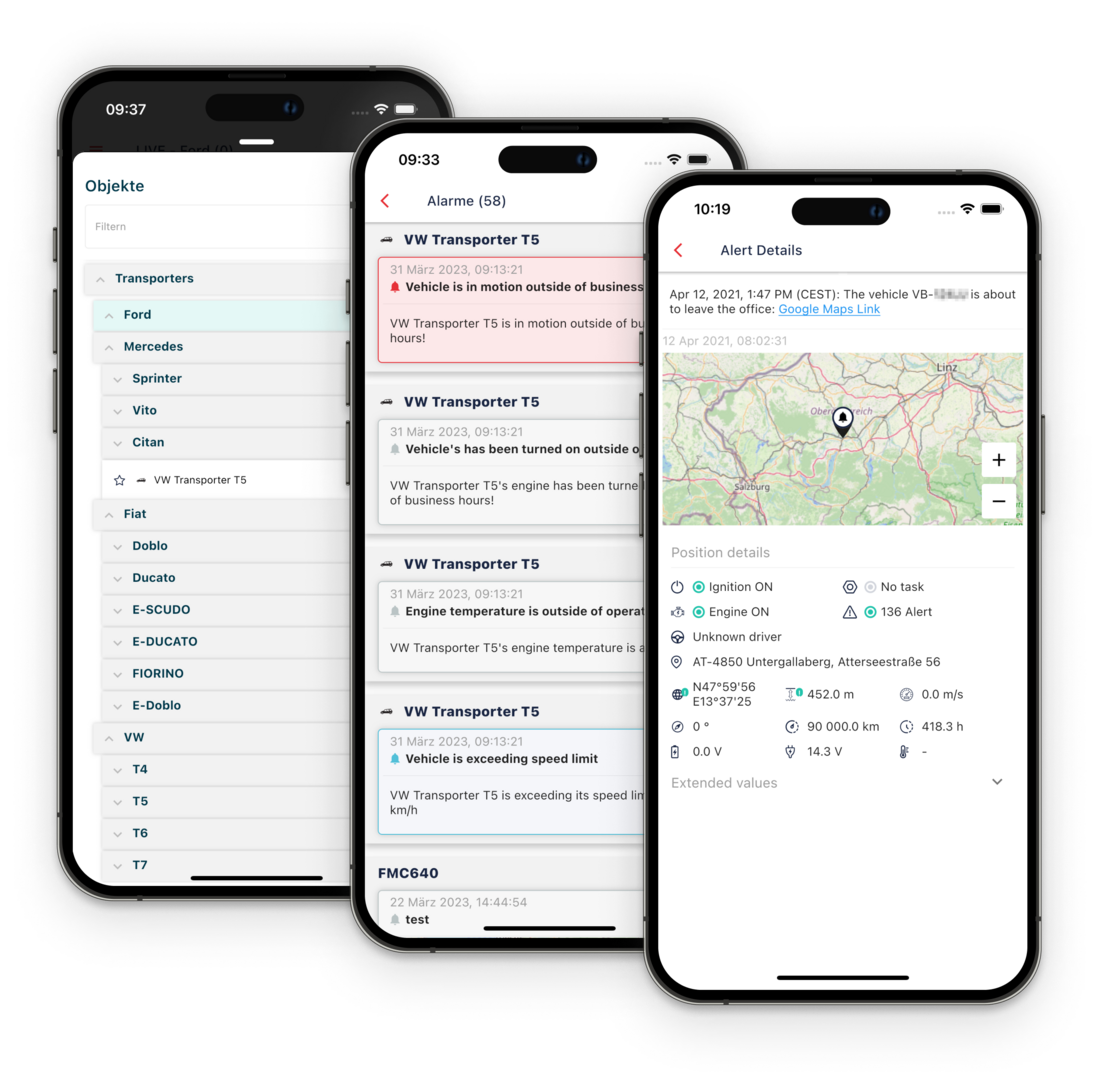
The R-COCKPIT app brings your fleet management to your mobile phone. Designed specifically for fleet managers and dispatchers who need to keep track of things whilst on the move, the app displays an interactive full-screen live map showing the current locations of all vehicles, machinery and assets. With a single tap on an item, you can view its status, current readings and last known address β€” as well as launch navigation directly to that location.

Functions

  • Live view of the current position of vehicles, machines and assets
  • Display of object groups and your personal favourites
  • Detailed object view of all information from the last data transmission, including all signals and measured values
  • History of the lane on the map
  • Display of alarms in total and per object


R-COCKPIT is the mobile extension of the COMMANDER telematics software.

An overview of all features


Please note that you need telematics solutions from Rosenberger Telematics to use the R-COCKPIT app.


Get the App!


All properties at a glance β€” wherever you are

Live map & fleet overview

Once you have logged in, R-COCKPIT automatically opens an interactive full-screen map showing the current positions of all objects to which your account has access. The map can be filtered by object group, allowing you to keep track of specific vehicle groups, construction site fleets or machine fleets.

  • Auto-refresh: The map refreshes automatically and continuously centres on the latest object positions.
  • Show object names: Displays the names directly on the map markers.
  • Object group filter: Narrow the view down to a specific group or sub-group, including the number of objects per group.
  • List of items: Swipe the bottom panel upwards to display all visible items as a searchable list. Tap an entry to open the details view.

More information about live tracking


Status, readings and route start with a single tap

Property details & navigation

Tap a map marker or a list entry to open the full details view for an item:

  • Current status: Driving status (e.g. driving, parked, working) with a timestamp of the last data transmission.
  • Last known address: Geocoded address of the most recently received position.
  • Measurements: All current telemetry data for the device; ignition status, speed, total mileage, operating hours, GPS quality and more.
  • Mini-map with navigation: Shows the last known location. Tap β€˜Navigate to’ to launch turn-by-turn navigation directly in your preferred navigation app.
  • Zones: Shows the defined zones in which the object was last located.
  • Object properties: All stored master data at a glance; can be expanded or collapsed.

Items can be saved as personal favourites so that you can find frequently used vehicles or machines more quickly.


No alarm goes unnoticed β€” even when you're out and about

Push-Benachrichtigungen & Alarme

R-COCKPIT sends push notifications for all configured alerts directly to your mobile phone. In the notification drawer, you can view all current alerts from your user inbox – filterable by read and unread status, and searchable via free-text search.

Tap on a message to open the full details: name, description and, where available, a map view showing the relevant location. Related objects or drivers are linked directly.

More information on alarms and anti-theft protection 


Frequently asked questions about the R-COCKPIT app

Who is R-COCKPIT designed for?

The app is designed for fleet managers, dispatchers and operations managers who need access to real-time fleet data even when they are away from the office.

What are the requirements for using it?

R-COCKPIT requires an active Rosenberger Telematics solution with COMMANDER, as well as the "Use R-COCKPIT" permission in your user account. In addition, the "View live telemetry data" and "View object" permissions are required to load fleet data.

On which devices does R-COCKPIT run?

The app is available for iOS and Android and can be downloaded free of charge from the Apple App Store and the Google Play Store.

Can I manage multiple businesses in the app?

Yes. If your account is linked to several companies and you have the necessary permissions, you can switch between companies directly within the app β€” without having to log in again.

Werden Positionen in Echtzeit aktualisiert?

Ja. Mit aktiviertem Auto-Refresh aktualisiert die Karte die Positionen laufend und zentriert sich automatisch auf die neuesten Standorte.

What happens during private journeys?

When private mode is enabled, the vehicle’s current position and address are hidden. Instead, the last known non-private position is displayed. This ensures that drivers’ privacy is protected at all times.